$ cat README.md
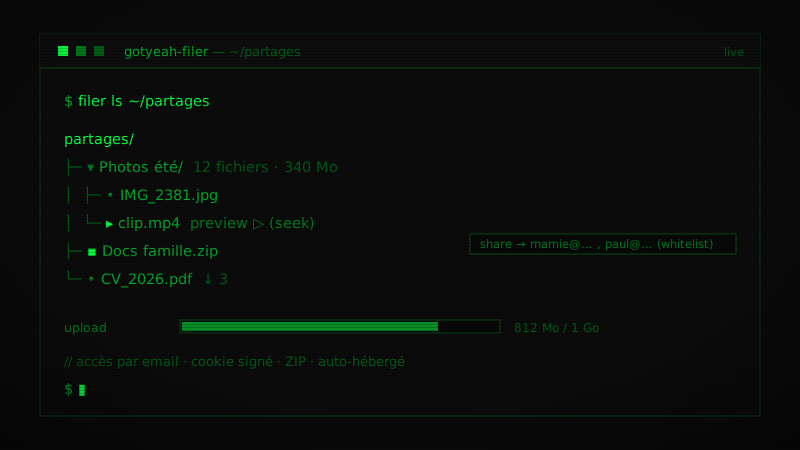
Service de partage de fichiers léger et auto-hébergé pour un usage familial. Les admins déposent en streaming, jusqu’à 1 Go configurable, rangent les fichiers en dossiers, puis créent des partages (un fichier ou un dossier entier) restreints à une liste d’emails.
Accès
- Admins par le SSO GotYeah, le compte unique commun à mes autres outils.
- Invités sans compte ni mot de passe, ils ouvrent le lien de partage et saisissent leur email, qui doit figurer dans la liste du partage. Un partage de dossier suit son contenu actuel.
Explorateur
- Écran d’accueil par dossiers, avec pour chacun le nombre de fichiers, le poids, le dernier ajout et les partages.
- UI maître-détail, navigation clavier, multi-sélection et opérations par lot (déplacer, supprimer, télécharger en ZIP).
- Filtres, recherche et tri, par type, nom, date ou taille.
- Aperçu en ligne, images, audio, vidéo avec avance rapide, PDF, et compteur de téléchargements par fichier.
Projection et retouche
- Mode projection plein écran immersif, fondu entre les images, et préchargement pour projeter même hors ligne.
- Mode présentateur à deux écrans, façon PowerPoint : l’image seule sur le projecteur, une régie avec l’image suivante, des notes par fichier et un chrono.
- Télécommande sur téléphone, appairée par un code : défiler, écran noir, notes, chrono, et avance automatique réglable image par image.
- Retouche d’image (luminosité, contraste, saturation, couleurs), en copie ou sur l’original avec confirmation, visible en direct sur le projecteur pendant le réglage.
Auto-hébergé, avec CI/CD GitHub Actions.
Lightweight, self-hosted file-sharing service for family use. Admins upload in streaming mode, up to a configurable 1 GB, organize files into folders, then create shares (a single file or an entire folder) restricted to a list of emails.
Access
- Admins through the GotYeah SSO, the single account shared with my other tools.
- Guests with no account or password, they open the share link and enter their email, which must be on the share’s list. A folder share follows the folder’s current content.
File explorer
- Folder home screen, showing for each folder its file count, size, latest addition and shares.
- Master-detail UI, keyboard navigation, multi-selection and batch operations (move, delete, download as ZIP).
- Filters, search and sorting, by type, name, date or size.
- Inline preview, images, audio, video with seeking, PDF, and a per-file download counter.
Projection and retouching
- Projection mode, immersive full screen, fades between images, and preloading to project even offline.
- Two-screen presenter mode, PowerPoint-style: the image alone on the projector, a control view with the next image, per-file notes and a timer.
- Phone remote, paired with a code: navigate, black screen, notes, timer, and auto-advance set image by image.
- Image retouching (brightness, contrast, saturation, colors), as a copy or on the original with confirmation, shown live on the projector while adjusting.
Self-hosted, with GitHub Actions CI/CD.